![[PukiWiki]](image/pukiwiki.png "[PukiWiki]")
Mac OS Xでは、
/System/Library/Sounds/
にシステムが使う効果音があります。高品位なのでおすすめです。
上記にあるaiffファイルの一つを鳴らしてみます。 以下の方法では短い音ファイル(30秒以下)だけに対応しているようです。
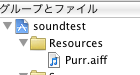
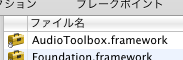
#import <AudioToolbox/AudioToolbox.h>および、変数を定義しておきます
SystemSoundID soundID;
 NSString *path = [[NSBundle mainBundle] pathForResource:@"Purr" ofType:@"aiff"];
 NSURL *url = [NSURL fileURLWithPath:path];
 AudioServicesCreateSystemSoundID((CFURLRef)url, &soundID);
と用意しておき
AudioServicesPlaySystemSound(soundID);を実行すれば音が出ます。
上記にあるaiffファイルの一つを鳴らしてみます。
import java.io.*;
import javax.sound.sampled.*;

public class AudioPlay {
	public static void main(String[] args)  {
		try{
			File audioFile = new File("/System/Library/Sounds/Ping.aiff");
			AudioFormat format = AudioSystem.getAudioFileFormat(audioFile).getFormat();
			DataLine.Info info = new DataLine.Info(Clip.class, format);
			Clip clip = (Clip)AudioSystem.getLine(info);

			clip.open(AudioSystem.getAudioInputStream(audioFile));
			clip.start();
			clip.drain();
			clip.close();
		}
		catch(Exception e){
			e.printStackTrace();
		}
	}
}
純粋な矩形波、しかも高音の矩形波の場合、 サンプリングして作ったファイルを鳴らすよりも、 矩形波のデータを用意して鳴らしたほうが、当然ですが綺麗な波形が出ます。
以下は、 サンプル周波数20kHz, 8ビット分解能で作った10kHzの矩形波 (長さは1秒, うち前半0.5秒は音あり、後半0.5秒は無音) を再生する手順です。
import javax.sound.sampled.*;

class sqwave {

public static void main (String args[]) {
	byte wave05[];
	int length05; //data length for 0.5 sec
	final int SAMPLE_RATE = 20000; //samling rate in Hz
	AudioFormat audioformat; //for audio
	SourceDataLine sourcedataline=null; //for audio

	audioformat = new AudioFormat(SAMPLE_RATE, 8, 1, true, true); //audio format

	DataLine.Info info = new DataLine.Info(SourceDataLine.class, audioformat);
	if(!AudioSystem.isLineSupported(info)){
		System.out.println("Line type not supported: "+info);
		System.exit(1);
	}
	try {
		sourcedataline = (SourceDataLine)AudioSystem.getLine(info);
		sourcedataline.open(audioformat, SAMPLE_RATE  ); //try to open the sourcedataline
	} catch(LineUnavailableException e) {
		System.out.println(e);
		System.exit(1);
	}

	//prepare the sound data for 0.5 sec square wave and 0.5 sec no sound

	//number of data for 0.5sec
	length05=SAMPLE_RATE / 2;

	//prepare wave form data for 05 sec
	wave05=  new byte[SAMPLE_RATE];

	for(int i=0; i< wave05.length;i++) {
		if(i<length05) {
			if( (i % 2) == 0) wave05[i]=120; //square wave
			else wave05[i]=-120; //square wave
		}
		else {
			wave05[i]=0; //no sound for last 0.5sec
		}
	}


	sourcedataline.start();

	sourcedataline.write(wave05, 0, wave05.length);
}

}
これで音が鳴ります。音が鳴っている間に出来るコントロールには、 以下のようなものがあります。
sourcedataline.start();
sourcedataline.stop();
sourcedataline.drain();
sourcedataline.flush();


